
Your conference rooms’ A/V does not have to be complicated.
You should not have to “Call IT!!” to come fix your conference room’s A/V system. Ever.
So why do we hear over and over and over the following mantra: “Yeah, can y’all come have a look at our conference rooms? Nothing ever works. Completely unreliable.”?
Well, it’s the answer is not complicated, but the setup of these conf rooms is. It’s overly complicated.
It doesn’t have to be. Here’s why most conference room A/V systems create nothing but pain for their users.
You flew to close to the sun.
OK, I jest, but it’s true. Here’s some of the things we’ve seen in just the last 6 months of evaluating, and ripping & replacing a bunch of conf room A/V systems.
* “We can watch the SuperBowl here!” You can, but you don’t need a direct CableTV hookup through the floor core for 1 day a year.
* “We have to be able to handle any type of connection!” No, you don’t. Look to the bell curve! Capture the 80%. The edge cases are edge cases for a reason.
* “It’s gotta have an HDMI cable hookup!” No, it doesn’t. How many of your company’s new laptops have an HDMI port? How many have USB-C? USB-C is ubiquitous.
* “It’s gotta have built in surround sound!” OK boomer, your Dad’s house in 1981 had “surround sound”, but he also had a “Hi Fi Stereo System”, didn’t he? And how are all those wires and built in speakers looking now? They’re decaying. In the walls. It costs a LOT of money to permanently install speakers in your ceiling, and more to rip them out 3 years later because they don’t work.
* “A speakerphone on the table is a must.” It’s actually not, and that’s one more cable you don’t really need.
Those are the most celebrated “must haves” for conference room A/V.
The new truth is that, thanks to 2020 and covid, not only did remote work get an upgrade, but conference room A/V did, too.
Here’s what most mid-sized conference rooms need:
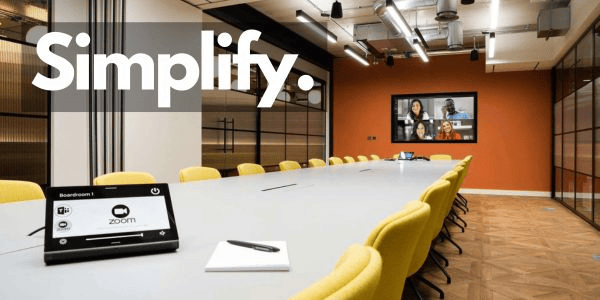
– 1 large TV screen/monitor (75″-85″) on the wall
– 1 Logitech Rally Bar (camera & speakers) below the screen
– 1 Logitech Tap IP controller on the table
That’s it. One (1) cable to/through your conference table.
It doesn’t have to be a Logitech. There’s Nureva, Neat, Barco, and others.
How do you decide? Are you a Microsoft shop or a Google shop? Microsoft Teams will point you in one direction. Google Meet another.
Prefer Zoom meetings? OK, Logitech has you covered.
If you’re a Microsoft shop, Teams will likely be your default, and from there, your 80% is covered. The “edge cases” can be taken care of by inviting “the conference room” to the Zoom or Google meeting.
And that’s the biggest improvement: the Conference Room is now an invitee & attendee at your meetings. Wanna have a meeting in “Room A”? Invite the room to the meeting. Inviting the room reserves the room on the calendar.
Share your screen? Create & join a Teams, Zoom, or Google meeting. Simple.
Now that we’re embracing hybrid WFH/RTO, conference rooms are used more than ever. Keep them simple.
Simplify Your A/V
Comments
More from Kevin
-

Still using Google?!?
Other than a specific “Image Search”, I no longer use Google to search for anything. I use Grok. If you’re not familiar with Grok, it’s the artificial intelligence engine produced by xAI, one of Elon Musk’s businesses. Grok is fed real time data via the “firehose” that comes out of X. Why Grok? Why not…
-
Simplify Your A/V
Your conference rooms’ A/V does not have to be complicated. You should not have to “Call IT!!” to come fix your conference room’s A/V system. Ever. So why do we hear over and over and over the following mantra: “Yeah, can y’all come have a look at our conference rooms? Nothing ever works. Completely unreliable.”?…
-

Learning to Rappel
More Search & Rescue (aka “SAR”) training this past weekend. This time, it was all about rappelling. For some of you, rappelling might be your weekend go-to hobby. This was my 2nd time. We spend the weekend in north Georgia learning all the basics of rappelling. We learned all the knots: bowline, square knot, figure…
-

Where’s Your 3rd Office?
Where do you work when you’re on the road? Sometimes we work at home. Sometimes we work in the office. But some other times, we get to work from our “third office”! Sounds exciting, doesn’t it? OK, maybe not “exciting”, but it could be, depending on where you go. So, your home office has a…
-

IRL vs. Virtual
Got 47 seconds? Please watch this Gary Vaynerchuk video on Instagram:https://lnkd.in/e7mMuk5S What matters most in the processes deep inside your organization? Speed, efficiency, and effectiveness matter in business. Gary Vaynerchuk suggests that those things occur best in person, in the office, and tells a very familiar story to back it up. The common story, at…
-

ATL CRE 2025
Earlier this week, CBRE announced the complete (CBRE already owned 40%) purchase of Industrious, bringing to light the new business segment within CRE known as “Building Operations & Experience (BOE)”. See Patrick Braswell‘s analysis here:https://lnkd.in/evCBPMBM At the end of 2024, just a couple of weeks ago, the following stats were published by Commercial Edge (link:…
-

“Full RTO!”
So, now that we’re 2 weeks in to 2025, who has returned to the office full time? Amazon? Anyone? Beuller? We (TRANSCEND LV) visited a very cool space today, in which the IT staff is preparing for “full RTO”. They’re updating conference rooms from old tech to new, updating WiFi access points, and otherwise preparing…
-
What’s Your Home Office Setup?
OK, now that Atlanta has recovered from our (first?) snow of the 2025 Winter, let’s talk home office setup. Full disclosure: my home office setup consists of the following items. * Windows laptop* Bluetooth mouse* Levenger Stanley Journal* Sharpie S-Gel pen* WiFi via Amazon Eero / AT&T internet I do my very best to print…
-
No Snow Days
It’s gonna snow in Atlanta on Friday. Currently, my weather app says 5-6″ of snow from Friday at noon through Saturday morning at about 6AM. We’ll see. I always keep my expectations low, so I don’t get disappointed by just a few flurries. I. Want. Snow! Which brings me to the real point: WFH is…

Leave a comment