
Your conference rooms’ A/V does not have to be complicated.
You should not have to “Call IT!!” to come fix your conference room’s A/V system. Ever.
So why do we hear over and over and over the following mantra: “Yeah, can y’all come have a look at our conference rooms? Nothing ever works. Completely unreliable.”?
Well, it’s the answer is not complicated, but the setup of these conf rooms is. It’s overly complicated.
It doesn’t have to be. Here’s why most conference room A/V systems create nothing but pain for their users.
You flew to close to the sun.
OK, I jest, but it’s true. Here’s some of the things we’ve seen in just the last 6 months of evaluating, and ripping & replacing a bunch of conf room A/V systems.
* “We can watch the SuperBowl here!” You can, but you don’t need a direct CableTV hookup through the floor core for 1 day a year.
* “We have to be able to handle any type of connection!” No, you don’t. Look to the bell curve! Capture the 80%. The edge cases are edge cases for a reason.
* “It’s gotta have an HDMI cable hookup!” No, it doesn’t. How many of your company’s new laptops have an HDMI port? How many have USB-C? USB-C is ubiquitous.
* “It’s gotta have built in surround sound!” OK boomer, your Dad’s house in 1981 had “surround sound”, but he also had a “Hi Fi Stereo System”, didn’t he? And how are all those wires and built in speakers looking now? They’re decaying. In the walls. It costs a LOT of money to permanently install speakers in your ceiling, and more to rip them out 3 years later because they don’t work.
* “A speakerphone on the table is a must.” It’s actually not, and that’s one more cable you don’t really need.
Those are the most celebrated “must haves” for conference room A/V.
The new truth is that, thanks to 2020 and covid, not only did remote work get an upgrade, but conference room A/V did, too.
Here’s what most mid-sized conference rooms need:
– 1 large TV screen/monitor (75″-85″) on the wall
– 1 Logitech Rally Bar (camera & speakers) below the screen
– 1 Logitech Tap IP controller on the table
That’s it. One (1) cable to/through your conference table.
It doesn’t have to be a Logitech. There’s Nureva, Neat, Barco, and others.
How do you decide? Are you a Microsoft shop or a Google shop? Microsoft Teams will point you in one direction. Google Meet another.
Prefer Zoom meetings? OK, Logitech has you covered.
If you’re a Microsoft shop, Teams will likely be your default, and from there, your 80% is covered. The “edge cases” can be taken care of by inviting “the conference room” to the Zoom or Google meeting.
And that’s the biggest improvement: the Conference Room is now an invitee & attendee at your meetings. Wanna have a meeting in “Room A”? Invite the room to the meeting. Inviting the room reserves the room on the calendar.
Share your screen? Create & join a Teams, Zoom, or Google meeting. Simple.
Now that we’re embracing hybrid WFH/RTO, conference rooms are used more than ever. Keep them simple.
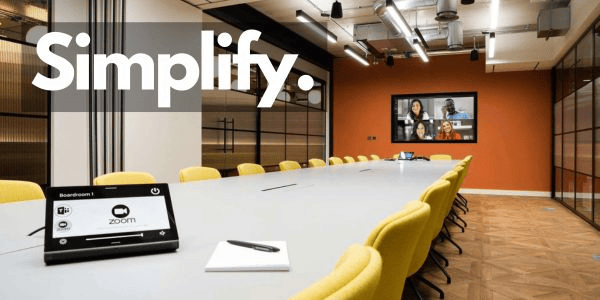
Simplify Your A/V
Comments
More from Kevin
-
“Does SEO make anyone feel warm & fuzzy?”
Lindsay Trinkle Visits #DGM2 Class @_GAAtlanta As we begin the second half of our 10 week Digital Marketing class, we welcome another great guest speaker from the Atlanta digital world. Our first speaker blew the doors off of market & customer segmentation, setting the bar high for our remaining three guest speakers. Tonight, Lindsay Trinkle,…
-
Three ways to auto-promote your blog posts via email
Cross posted from the General Assembly Blog. There are many ways to share the content that you’ve created on your blog; however, the most reliable method of promoting your blog to your intended audience is through email. Most people check their social networks regularly, but everyone reads – or at least checks – their email…
-
The Math of the Marketing Funnel
We’ve been talking about the marketing funnel just about every session of Digital Marketing, but we hadn’t really brought it to life yet. So, in our mid-term (10th session) of the #DGM2 class, we focused completely on the math of the marketing funnel. The marketing funnel, because marketing is ALL about the numbers. #dgm2 A…
-
Google Analytics for Bloggers
We’re halfway through the Digital Marketing class here at General Assembly. One of the biggest challenges in the class is tackling Google Analytics, which is a big, hairy, complex beast of a tool that can either overwhelm you or totally guide you. If you are or aspire to be a digital marketer, then you must…
-
10rocket’s Blog Challenge
I’ve known Chris Turner, the founder of 10Rocket since early last year, when he and I met at Tech Talent South. Shortly after that, Chris enrolled in The Iron Yard‘s Ruby on Rails software developer course, because he wanted to be able to build the software product that he had envisioned. A few months later,…
-
Marketing is all about the numbers
Tonight we got a special treat at our #DGM2 class: Maria Joyner of Synapp.io laid down the growth hacking truth on the class, setting the bar very high for our next three guest speakers. Who knew that Synapp.io was her first salaried job? The key to Maria’s success? “Find a startup that’s killing it, and…
-
7 Habits Of Highly Effective Bloggers
Cross-posted from the General Assembly blog Beyond the obvious (write), there are tactics that you should build into the DNA of your blogging strategy. These are things that should become habitual, so you don’t even have to think about doing each of them. These are blogging habits that you see in the most successful blogs,…
-
Learn Something New
I read a lot of blogs every day. A lot of blogs. Today, one of John Saddington’s four blog posts today (he blogs for himself and for Desk) caught my eye and made me think. John wrote about Roost, a plugin for WordPress that enables Safari users to get push notifications of new posts. So what?…

Leave a comment