
Your conference rooms’ A/V does not have to be complicated.
You should not have to “Call IT!!” to come fix your conference room’s A/V system. Ever.
So why do we hear over and over and over the following mantra: “Yeah, can y’all come have a look at our conference rooms? Nothing ever works. Completely unreliable.”?
Well, it’s the answer is not complicated, but the setup of these conf rooms is. It’s overly complicated.
It doesn’t have to be. Here’s why most conference room A/V systems create nothing but pain for their users.
You flew to close to the sun.
OK, I jest, but it’s true. Here’s some of the things we’ve seen in just the last 6 months of evaluating, and ripping & replacing a bunch of conf room A/V systems.
* “We can watch the SuperBowl here!” You can, but you don’t need a direct CableTV hookup through the floor core for 1 day a year.
* “We have to be able to handle any type of connection!” No, you don’t. Look to the bell curve! Capture the 80%. The edge cases are edge cases for a reason.
* “It’s gotta have an HDMI cable hookup!” No, it doesn’t. How many of your company’s new laptops have an HDMI port? How many have USB-C? USB-C is ubiquitous.
* “It’s gotta have built in surround sound!” OK boomer, your Dad’s house in 1981 had “surround sound”, but he also had a “Hi Fi Stereo System”, didn’t he? And how are all those wires and built in speakers looking now? They’re decaying. In the walls. It costs a LOT of money to permanently install speakers in your ceiling, and more to rip them out 3 years later because they don’t work.
* “A speakerphone on the table is a must.” It’s actually not, and that’s one more cable you don’t really need.
Those are the most celebrated “must haves” for conference room A/V.
The new truth is that, thanks to 2020 and covid, not only did remote work get an upgrade, but conference room A/V did, too.
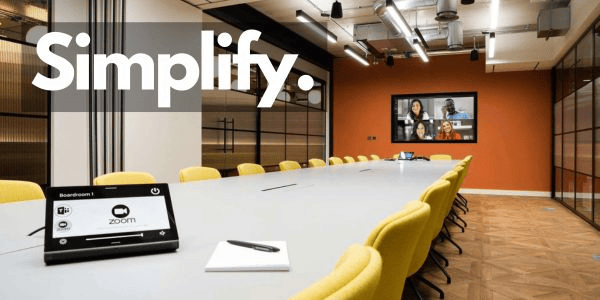
Here’s what most mid-sized conference rooms need:
– 1 large TV screen/monitor (75″-85″) on the wall
– 1 Logitech Rally Bar (camera & speakers) below the screen
– 1 Logitech Tap IP controller on the table
That’s it. One (1) cable to/through your conference table.
It doesn’t have to be a Logitech. There’s Nureva, Neat, Barco, and others.
How do you decide? Are you a Microsoft shop or a Google shop? Microsoft Teams will point you in one direction. Google Meet another.
Prefer Zoom meetings? OK, Logitech has you covered.
If you’re a Microsoft shop, Teams will likely be your default, and from there, your 80% is covered. The “edge cases” can be taken care of by inviting “the conference room” to the Zoom or Google meeting.
And that’s the biggest improvement: the Conference Room is now an invitee & attendee at your meetings. Wanna have a meeting in “Room A”? Invite the room to the meeting. Inviting the room reserves the room on the calendar.
Share your screen? Create & join a Teams, Zoom, or Google meeting. Simple.
Now that we’re embracing hybrid WFH/RTO, conference rooms are used more than ever. Keep them simple.
Simplify Your A/V
Comments
More from Kevin
-
Normal is just a setting on the dryer
We’re in session 3 of Digital Marketing at General Assembly, and the word “normal” has popped up in our discussions of analytics and measurement. What is normal? Some would say “normal is just a setting on the dryer”, but we’re not talking about “life” normal, but marketing analytics normal. In the DGM world, “normal” is…
-
How to Generate New Ideas For Your Blog
Cross posted from the General Assembly blog. One of the most frustrating things about blogging – or writing in general – is coming up with new and fresh topics. You may call it “writer’s block,” and everyone who is even somewhat engaged in creating written content has run into writer’s block at least once. Well,…
-
How To Start Your Email Newsletter
Cross posted from the General Assembly blog. There are many parts to a content marketing strategy. One of the most important parts is an email newsletter. Despite many cries to the contrary, email is not dead as a marketing tool. In fact, email remains the most effective digital marketing tool, in spite of the meteoric…
-
Week 1 of Digital Marketing @GA
I could not ask for a more enthusiastic and engaging group for this session of Digital Marketing at GA’s Atlanta location. In our first two sessions, there has not been a dull moment. So far, we’ve delved mainly into creating a brand and articulating that brand’s message. Last night we got a great insight into…
-
How To Start a Blog For Your Business
Cross-posted from the General Assembly blog. In the daily operation of Atlanta Tech Blogs, I have spoken to dozens of daily and weekly bloggers about what, how, and why they blog. Unfortunately, I’ve spoken with many more businesses who do not blog. The reasons so many startups and small businesses do not blog are many,…
-
DGM: It’s on
The Digital Marketing (DGM) class at General Assembly‘s Atlanta campus starts TONIGHT, and it’s on from the start. Here’s a quick peek into what the next 10 weeks will hold. Day 1 – we’re bringing Pitch Practice into Digital Marketing! Can you believe it? That’s right, the first step in your digital marketing journey is…
-
Teaching Assistant Needed for Digital Marketing Class
I’m leading the Digital Marketing class at General Assembly Atlanta starting Tuesday Jan 27. The class will take place every Tuesday and Thursday night through April 2 at GA’s location at Ponce City Market in Midtown. The class is full, and we need a teaching assistant. While there will be an occaision or two to…
-
4 steps to outsource your blog
After Monday’s post outlining some of the benefits of outsourcing your content marketing, I received several surprised reactions and comments, mainly they didn’t even know they could outsource their blog. Here’s where we are: You know you should have an active company blog You know why you should have an active company blog You know now that…

Leave a comment